
Submitting Event Results
I. Steps to Submit Results
- Please visit the CHUNITHM Tools Website to copy the bookmark link, or you can directly copy the link below and save it to your browser bookmarks (if you have already copied the same bookmark before, you may skip this step).
JS
javascript:(function(d,s){s=d.createElement('script');s.src='https://jack4215.github.io/chuni-tools/scripts/chuni-tools.js?t='+Math.floor(Date.now()/60000);d.body.append(s);})(document);- Go to CHUNITHM-NET > Record > Play History and run the bookmark. Select the event and click the submit button.
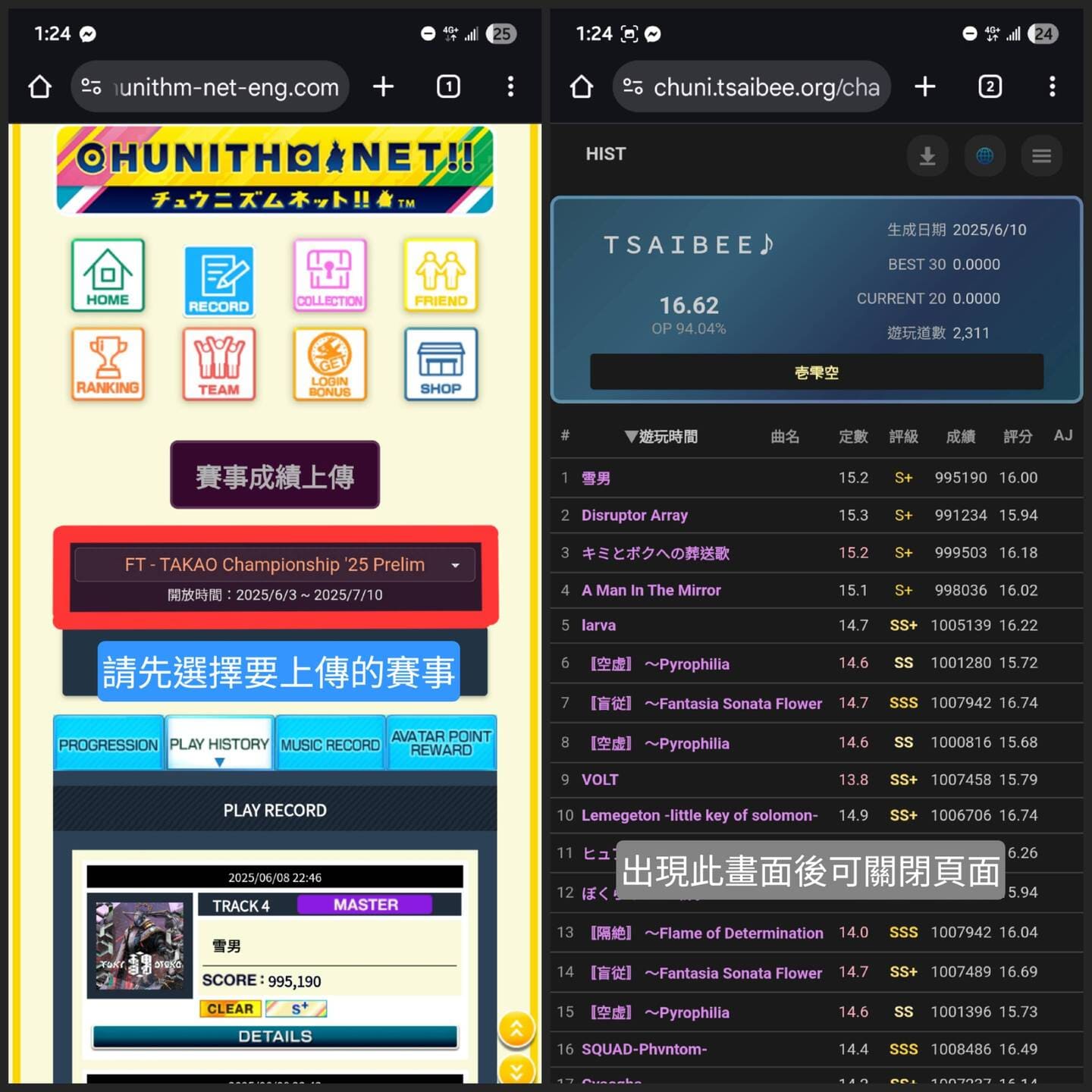
- After submitting, please wait about 3 minutes before checking your record on the live event status page. If it does not appear, please try submitting again.
II. Important Notes
The system only accesses the most recent 20 played songs, so please make sure to submit your results within those 20 plays.
The designated setlist does not need to be completed in the same play session but must be continuous and in the correct order.
You may challenge and submit multiple times; however, the leaderboard will only display the highest total score for each player.
In the event of a tie, the player who submitted first will rank higher.
Unless otherwise specified, the submission time is based on the GMT+8 time zone.
By submitting your results, you agree that the event organizer and website administrators may collect and process your player information.